
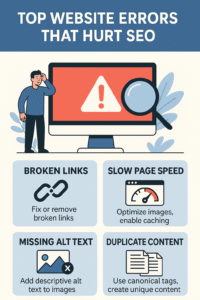
In the digital age, your website is your storefront. But even the most beautifully designed sites can suffer from hidden errors that sabotage search engine rankings, user experience, and conversions. Whether you’re a business owner, marketer, or developer, understanding common website errors and how to fix them is crucial for SEO success.
In this blog, we’ll explore the most common website errors, their impact on SEO, and actionable ways to resolve them. These insights are based on expert recommendations and SEO best practices. Let’s dive in.
1. 404 Errors (Page Not Found)
What it is: A 404 error occurs when a user tries to access a page that doesn’t exist.
Impact on SEO: Broken links waste crawl budget, frustrate users, and reduce your site’s credibility. Google may lower your rankings if too many 404s are detected.
How to fix:
- Use tools like Google Search Console or Ahrefs to identify broken links.
- Implement 301 redirects to guide users to relevant pages.
- Regularly audit your site for outdated or deleted URLs.
2. Slow Page Speed
What it is: Pages that take too long to load due to large images, bloated code, or server issues.
Impact on SEO: Google prioritizes fast-loading websites. Slow pages increase bounce rates and reduce conversions.
How to fix:
- Compress images using tools like ShortPixel or WebP.
- Minify CSS and JavaScript.
- Use a Content Delivery Network (CDN).
- Leverage browser caching and optimize fonts.
3. Duplicate Content
What it is: Identical or very similar content across multiple pages or domains.
Impact on SEO: Confuses search engines, dilutes ranking signals, and may lead to penalties.
How to fix:
- Use canonical tags to specify preferred versions.
- Consolidate similar pages.
- Audit your site with Copyscape or Siteliner.
4. Missing or Poor Meta Tags
What it is: Title tags and meta descriptions that are missing, duplicated, or irrelevant.
Impact on SEO: Reduces click-through rates and affects how search engines understand your content.
How to fix:
- Write unique, keyword-rich titles and descriptions.
- Keep titles under 60 characters and descriptions under 160.
- Include calls-to-action (CTAs) and relevant keywords.
5. Not Optimizing for Mobile
What it is: Websites that don’t adapt well to mobile devices.
Impact on SEO: Google uses mobile-first indexing, meaning mobile usability directly affects rankings.
How to fix:
- Use responsive design.
- Test your site with Google’s Mobile-Friendly Test.
- Optimize images and content for mobile speed.
6. Poor Internal Linking
What it is: Lack of links between pages within your site.
Impact on SEO: Reduces crawlability and link equity distribution, making it harder for search engines to understand site structure.
How to fix:
- Link related pages using descriptive anchor text.
- Use tools like Ahrefs Site Audit to find internal link opportunities.
7. Blocking Google from Crawling or Indexing
What it is: Incorrect use of robots.txt or noindex tags.
Impact on SEO: Prevents Google from accessing or ranking your content.
How to fix:
- Check your robots.txt file for disallow rules.
- Remove unnecessary noindex tags.
- Use Google Search Console to monitor indexing status.
8. Keyword Stuffing
What it is: Overusing keywords unnaturally in content.
Impact on SEO: Google penalizes keyword stuffing, which can hurt rankings and user experience.
How to fix:
- Focus on natural language and semantic keywords.
- Use tools like Search Atlas Content Genius to optimize keyword density.
9. Broken Images and Missing Alt Text
What it is: Images that don’t load or lack descriptive alt attributes.
Impact on SEO: Hurts accessibility and image search rankings.
How to fix:
- Fix broken image paths.
- Add keyword-rich alt text to all images.
- Use tools like Screaming Frog to identify issues.
10. Faulty Redirects
What it is: Redirect chains, loops, or incorrect redirect types.
Impact on SEO: Can cause lost link equity and slow page loads.
How to fix:
- Use 301 redirects for permanent moves.
- Avoid redirect chains and loops.
- Audit redirects using tools like Screaming Frog.
Final Thoughts
Website errors are more than just technical glitches—they’re SEO killers. By proactively identifying and fixing these issues, you can improve your site’s visibility, user experience and conversion rates.
Need help auditing your site? Use tools like Google Search Console, Ahrefs, Search Atlas and Screaming Frog to stay ahead of the curve.
What are 404 errors?
How can I detect broken links and 404 errors on my site?
What is considered “slow page speed,” and how does it impact SEO?
What are meta tags, and how do missing or poor meta tags hurt SEO?
Why is “mobile optimization” important?
What is keyword stuffing, and why is it harmful?
Can I fix these SEO errors myself, or do I need a developer/agency?
If I don’t fix these errors, what risks do I face?
How often should I audit my website for SEO errors?
What are “faulty redirects,” and how can I fix them?
To fix: use 301 redirects for permanent page moves, avoid long chains, test redirects, and audit them periodically





Thank you for your sharing. I am worried that I lack creative ideas. It is your article that makes me full of hope. Thank you. But, I have a question, can you help me? https://www.binance.info/id/register?ref=UM6SMJM3